6 Errors and Exception Handling in C++
Debug Builds
When developing C++ programs, it’s common to use different build configurations for debugging and release. A debug build includes additional information and checks that help you identify and fix errors, while a release build is optimized for performance and typically omits these checks.
We can do this by using a macros such as Debug to conditionally include debug-specific code. You can than add the flag -DDebug when compiling to enable debug mode besides -g3 for including debug information.
debug.h
#pragma once

#include <iostream>

#include "./terminal-colors.h"

using std::cout;
using std::endl;

#ifdef Debug
// return important information
#define info(x) cout << terminal::green << "𝑖 " << x << terminal::reset << endl
// echo input commands
#define input(x) cout << terminal::blue << "> " << x << terminal::reset << endl
// warn about potential issues
#define warning(x) cout << terminal::yellow << "! " << x << terminal::reset << endl
// report errors
#define error(x) cout << terminal::red << "↯ " << x << terminal::reset << endl
// check a condition and report if it fails
#define check(x)                   \
  if (!(x)) {                      \
    error("check failed: " << #x); \
  }

// If the debug flag is not set, all debug macros are defined as empty
#else
// return important information
#define info(x)
// echo input commands
#define input(x)
// warn about potential issues
#define warning(x)
// report errors
#define error(x)
// check a condition and report if it fails
#define check(x)
#endif
with terminal-colors.h
#pragma once

#ifdef _WIN32

// Windows terminals may not support ANSI escape codes by default
namespace terminal {
constexpr const char* reset = "";
constexpr const char* black = "";
constexpr const char* red = "";
constexpr const char* green = "";
constexpr const char* yellow = "";
constexpr const char* blue = "";
constexpr const char* magenta = "";
constexpr const char* cyan = "";
constexpr const char* white = "";
}  // namespace terminal

#else // Probably a Unix-like terminal

namespace terminal {

constexpr const char* reset = "\033[0m";
constexpr const char* black = "\033[30m";
constexpr const char* red = "\033[31m";
constexpr const char* green = "\033[32m";
constexpr const char* yellow = "\033[33m";
constexpr const char* blue = "\033[34m";
constexpr const char* magenta = "\033[35m";
constexpr const char* cyan = "\033[36m";
constexpr const char* white = "\033[37m";

}  // namespace terminal

#endif
Exceptions
In C++, exceptions provide a way to handle errors and other exceptional conditions in a structured manner. When an error occurs, an exception can be thrown, which transfers control to a corresponding catch block that handles the error.
there are several standard exception types in C++ such as std::invalid_argument, std::domain_error, and std::runtime_error that can be used to indicate different kinds of errors.
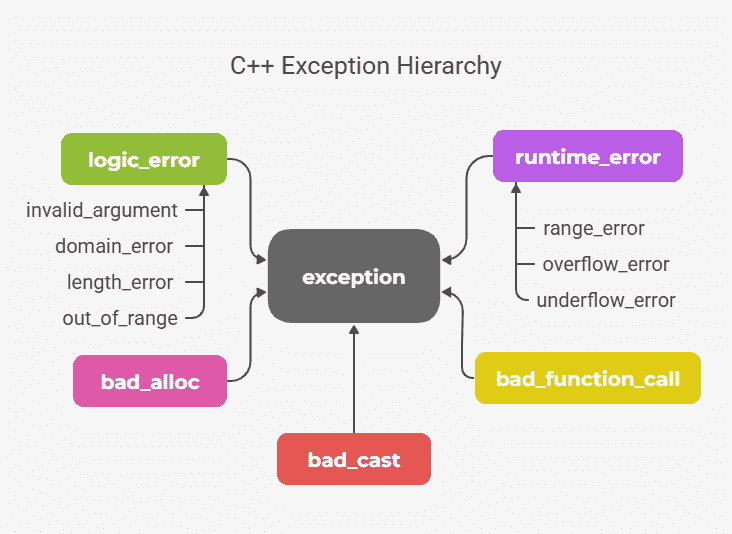
Lets go over each of them:
logic_error: a generic logic error.invalid_argument: thrown when an invalid argument is passed to a function.domain_error: thrown when a mathematical domain error occurs.length_error: thrown when an operation would result in an invalid length.out_of_range: thrown when an index is out of range.
runtime_error: a generic runtime error.overflow_error: thrown when an arithmetic overflow occurs.underflow_error: thrown when an arithmetic underflow occurs.range_error: thrown when a result is out of the allowed range.
bad_alloc: thrown when memory allocation fails.bad_cast: thrown when a dynamic cast fails.bad_typeid: thrown when an attempt is made to usetypeidon a null pointer to a polymorphic type.
#include <exception>
#include <iostream>
#include <stdexcept>

using std::cout;
using std::endl;

// approximate sqrt using Newton's method
double sqrt(double x) {
    if (x < 0) {
        // on could also use std::invalid_argument here, but domain_error is
        // more appropriate for sqrt of negative numbers
        throw std::domain_error("cannot take sqrt of negative number");
    }
    double guess = x / 2.0;
    double next_guess;
    constexpr double ε = 1e-10;
    int count = 0;
    do {
        ++count;
        double next_guess = (guess + x / guess) / 2.0;
        guess = next_guess;
    } while (std::abs(next_guess - guess) > ε && count < 1000);
    return guess;
}

int fib(int n) {
    if (n < 0) {
        // negative arguments are not allowed for the Fibonacci function. One
        // could also use std::domain_error here, but invalid_argument is more
        // appropriate for indicating that the input itself is invalid.
        throw std::invalid_argument("Negative argument not allowed in fib");
    }
    if (n == 0) return 0;
    if (n == 1) return 1;
    return fib(n - 1) + fib(n - 2);
}

int main() {
    try {
        cout << fib(2) << ", "
            << sqrt(0.25) << ", "
            << fib(-2) << ", "
            << sqrt(-4.0);

    } catch (std::runtime_error& e) { // catch runtime errors
        cout << "Runtime error: " << e.what() << endl;
    } catch (std::domain_error& e) { // catch domain errors
        cout << "Domain error: " << e.what() << endl;
    } catch (std::exception& e) { // catch all standard exceptions
        cout << "Exception caught: " << e.what() << endl;
    }
    return 0;
}