2 Basics of C++
Taking Input
Often, when we write a program, we want to take some input, for example:
git pull # pull tells the program git to update the local repository with the latest changes from the remote repositoryor
factorial 5 # factorial tells the program to calculate the factorial of 5
> 120
The way we do this in C++ and C is with a so-called argument vector, which is a list of c-strings that are passed to the program when it is started. The first argument is always the name of the program itself, and the following arguments are the ones that we pass to the program.
let’s look at an example: quick.cpp
#include <iostream>
#include <ranges>

using std::cout;
using std::endl;
using std::views::iota;

/*
main can either take no arguments or two arguments, the first one is the number of arguments and the second one is the argument vector.
*/
auto main(int argC, char** argV) -> int {
    cout << "The program name is: " << argV[0] << endl;
    cout << "The number of arguments is: " << argC << endl;
    for (int i : iota(1, argC)) {
        cout << "Argument " << i << ": " << argV[i] << endl;
    }
    return 0;
}
g++ -std=c++20 -o quick quick.cpp # compile the program
./quick hello world # run the program with two arguments
> The program name is: ./quick
> The number of arguments is: 3
> Argument 1: hello
> Argument 2: worldWorking with Arguments
Arguments are passed to the program as c-strings, which are arrays of characters. To work with them, we need to convert them to the appropriate type. For example, if we want to take two integers as input, we can use the std::atoi (argument to integer) function from the standard library <cstdlib> to convert the c-strings to integers.
Alternatively, we can use std::stoi (string to integer), which is a safer alternative that throws an exception if the conversion fails.
// import the standard library for general purpose functions: std::atoi
#include <cstdlib>
// input/output stream for printing to the console
#include <iostream>

using std::cout; // use console output stream for printing
using std::endl; // use endline for new lines
using std::cerr; // use console error output stream for error messages

// MAIN FUNCTION
// argC: 3
// argV: {callpath, numerator, denominator}
auto main(int argC, char** argV) -> int {
    // check if the number of arguments is correct
    if (argC != 3) {
        cerr << "Usage: " << argV[0] << " <numerator> <denominator>" << endl;
        return 1; // return an error code
    }

    // convert the arguments to integers
    int numerator = std::atoi(argV[1]);
    int denominator = std::atoi(argV[2]);

    // perform the division and print the result
    if (denominator == 0) {
        cerr << "Error: Division by zero" << endl;
        return 1; // return an error code
    }

    int result = numerator / denominator;
    cout << "Result: " << result << endl;

    return 0; // return success
}
Then we can compile and run the program with different arguments:
g++ -std=c++20 -o divide divide.cpp # compile the program
./divide 13 3
> Result: 4
./divide 13 0
> Error: Division by zero
Now let’s take a look at how the input looks in C++:
The italic zeros at the end of each character array represent the null character
\0, which marks the end of a c-string. A c-string is simply an array of characters terminated by a null character.
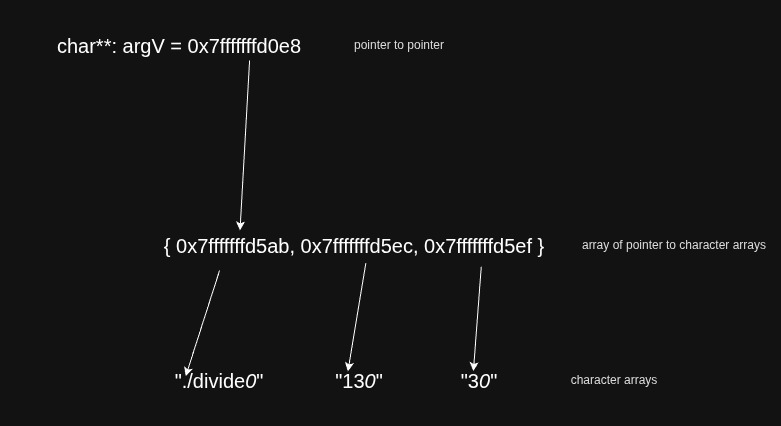
Input via the command line
Sometimes we want to write a program that can take continuously new input from the command line, for example, a calculator program that can take new expressions to evaluate. In this case, we can use the std::cin (console input stream) together with the >> extraction operator to read individual values from the user, one token at a time.
Let’s look at an example, a simple command-line calculator: calculator.cpp
#include <iostream>

enum class Operation {
    Add = '+',
    Subtract = '-',
    Multiply = '*',
    Divide = '/',
};

auto main() -> int {
    // always remember the last value calculated
    float value = 0.0f;

    char op;
    float operand;
    std::cout << "calculator> ";
    // read input from the user until EOF (Ctrl+D on Linux/Mac, Ctrl+Z on Windows)
    // std::cin evaluates to false once an extraction fails, e.g. at EOF
    while (std::cin >> op >> operand) {
        // perform the operation
        switch (static_cast<Operation>(op)) {
            case Operation::Add:
                value += operand;
                break;
            case Operation::Subtract:
                value -= operand;
                break;
            case Operation::Multiply:
                value *= operand;
                break;
            case Operation::Divide:
                if (operand == 0) {
                    std::cerr << "Error: Division by zero" << std::endl;
                } else {
                    value /= operand;
                }
                break;
            default:
                std::cerr << "Error: Unknown operation" << std::endl;
                break;
        }

        // print the result and prompt for the next one
        std::cout << "> " << value << std::endl << "calculator> ";
    }
    return 0;
}
This program will read an operator and an operand from the user, perform the operation on the last value calculated, and print the result. The program will continue to read input until EOF is reached. Here is an example of how to use the calculator:
g++ -std=c++20 -o calculator calculator.cpp # compile the program
./calculator
calculator> +50
> 50
calculator> +4
> 54
calculator> +9.6
> 63.6
calculator> /7
> 9.08571
calculator> *2
> 18.1714
calculator>
To read a whole line of input at once, rather than one token at a time, you can use the std::getline function, which reads a line from a stream and stores it in a std::string — we’ll use this in the next example.
In and Output via Files
In C++, you can also read input from files and write output to files using the std::ifstream and std::ofstream classes from the <fstream> header. These are subclasses of the std::istream and std::ostream classes, which means that they inherit all the functionality of the input and output streams.
Let’s look at a simple example that copies a file’s contents to another file, line by line: copy.cpp
#include <iostream>
#include <fstream>
#include <string>

using std::ifstream; // input file stream
using std::ofstream; // output file stream

auto main(int argC, char** argV) -> int {
    if (argC != 3) {
        std::cerr << "Usage: " << argV[0] << " <input file> <output file>" << std::endl;
        return 1;
    }
    // create an input file stream
    ifstream inputFile(argV[1]);
    // create an output file stream
    ofstream outputFile(argV[2]);

    // check if the input file was opened successfully
    if (!inputFile.is_open()) {
        std::cerr << "Error: Could not open input file" << std::endl;
        return 1;
    }

    // check if the output file was opened successfully
    if (!outputFile.is_open()) {
        std::cerr << "Error: Could not open output file" << std::endl;
        return 1;
    }

    // read from the input file and write to the output file
    std::string line;
    while (std::getline(inputFile, line)) {
        outputFile << line << std::endl;
    }

    // close the files
    inputFile.close();
    outputFile.close();

    return 0;
}
g++ -std=c++20 -o copy copy.cpp # compile the program
./copy input.txt output.txt # read input.txt and write its contents to output.txtFunctions
In C++, functions are blocks of code that perform a specific task. They allow you to break down your program into smaller, manageable pieces, making it easier to read, maintain, and reuse code. Functions can take input parameters, perform operations, and return a value.
Function Syntax
Old C-style function syntax looks like this:
// always comment the function with a brief description of what it does
output_type functionName(input_type1 param1, input_type2 param2, ...) {
    // function body
    // perform operations
    return value; // return a value of output_type
}
Modern C++ syntax allows for a more expressive way to define functions using the auto keyword and trailing return types:
// always comment the function with a brief description of what it does
auto functionName(input_type1 param1, input_type2 param2, ...) -> output_type {
    // function body
    // perform operations
    return value; // return a value of output_type
}
Calling a Function
To call a function, you simply use its name followed by parentheses containing any required arguments. If the function does not require any arguments, you can call it with empty parentheses.
It’s a good practice to name the parameters of a function in a way that clearly indicates their purpose. This makes the function easier to understand and use.
#include <iostream>

// defining a function

// This function performs integer division of two numbers
// - Args: numerator and denominator
auto integer_division(int numerator, int denominator) -> int {
    return numerator / denominator;
}

auto main() -> int {
    // calling the function with named parameters
    // if the parameters are not well known it's good practice to name them in the function call as well
    int result = integer_division(/*numerator*/10, /*denominator*/2);
    std::cout << "Result: " << result << std::endl; // Output: Result: 5
    return 0;
}
Noexcept Keyword
In C++, the noexcept keyword is used to specify that a function does not throw any exceptions. This can help the compiler optimize the code and also provides better documentation for the function’s behavior.
// This function is guaranteed not to throw any exceptions
auto safe_division(int numerator, int denominator) noexcept -> int {
    if (denominator == 0) {
        denominator = 1; // Avoid division by zero by setting denominator to 1
    }
    return numerator / denominator;
}
Recursion
Functions can call themselves, a concept known as recursion. Recursive functions are useful for solving problems that can be broken down into smaller, similar subproblems. However, it’s important to have a base case to prevent infinite recursion.
// This function calculates the factorial of a number using recursion
// n ↦ n!
auto factorial(int n) -> int {
    // Base case: if n is 0 or 1, return 1
    if (n <= 1) {
        return 1;
    }
    // Recursive case: n * factorial of (n - 1)
    return n * factorial(n - 1);
}
Operators
Operators are symbols that tell the compiler to perform a specific mathematical, logical, or bitwise operation on one or more operands.
Arithmetic Operators
The most basic operators work on numbers just like in mathematics:
| Operator | Description | Example | Result |
|---|---|---|---|
+ |
Addition | 3 + 4 |
7 |
- |
Subtraction | 10 - 3 |
7 |
* |
Multiplication | 3 * 4 |
12 |
/ |
Division | 10 / 4 |
2 (integer division!) |
% |
Modulo (remainder) | 10 % 3 |
1 |
Integer division: When both operands are integers,
/discards the remainder. Use10.0 / 4or cast one operand todoubleto get a decimal result.
#include <iostream>
using std::cout;
using std::endl;

auto main() -> int {
    int a = 10, b = 3;
    cout << a + b << endl;          // Output: 13
    cout << a - b << endl;          // Output: 7
    cout << a * b << endl;          // Output: 30
    cout << a / b << endl;          // Output: 3  (integer division)
    cout << (double)a / b << endl;  // Output: 3.33333  (cast to double first)
    cout << a % b << endl;          // Output: 1
    return 0;
}
Assignment Shorthand
Instead of writing x = x + 1, C++ provides compact compound assignment operators:
| Operator | Equivalent | Description |
|---|---|---|
x += n |
x = x + n |
Add and assign |
x -= n |
x = x - n |
Subtract and assign |
x *= n |
x = x * n |
Multiply and assign |
x /= n |
x = x / n |
Divide and assign |
x %= n |
x = x % n |
Modulo and assign |
++x / x++ |
x = x + 1 |
Increment (prefix/postfix) |
--x / x-- |
x = x - 1 |
Decrement (prefix/postfix) |
Prefix vs. postfix:
++xincrements first and then returns the new value;x++returns the current value and then increments.
Boolean (Logical) Operators
Boolean operators work on bool values (true / false) and are used to combine conditions:
| Operator | Name | Description | Example |
|---|---|---|---|
&& |
AND | true only if both operands are true |
x > 0 && x < 10 |
\|\| |
OR | true if at least one operand is true |
x < 0 \|\| x > 10 |
! |
NOT | Inverts the boolean value | !isReady |
#include <iostream>
using std::cout;
using std::endl;

auto main() -> int {
    bool a = true, b = false;
    cout << (a && b) << endl;  // Output: 0  (false)
    cout << (a || b) << endl;  // Output: 1  (true)
    cout << (!a)     << endl;  // Output: 0  (false)
    cout << (!b)     << endl;  // Output: 1  (true)
    return 0;
}
Short-circuit evaluation:
&&stops evaluating as soon as it sees afalse, and||stops as soon as it sees atrue. This meansptr != nullptr && ptr->value > 0is safe — the right side is only evaluated ifptris not null.
Bitwise Operators
Bitwise operators work directly on the binary representation of integers, one bit at a time. They are commonly used in systems programming, graphics, and performance-critical code.
| Operator | Name | Description |
|---|---|---|
& |
Bitwise AND | Sets a bit to 1 only if both bits are 1 |
\| |
Bitwise OR | Sets a bit to 1 if at least one bit is 1 |
^ |
Bitwise XOR | Sets a bit to 1 if exactly one bit is 1 |
~ |
Bitwise NOT | Flips all bits |
<< |
Left shift | Shifts bits left (multiply by powers of 2) |
>> |
Right shift | Shifts bits right (divide by powers of 2) |
#include <iostream>
using std::cout;
using std::endl;

auto main() -> int {
    //        binary: 0101 = 5
    //        binary: 0011 = 3
    int a = 5, b = 3;
    cout << (a & b)  << endl;  // 0001 → Output: 1   (AND)
    cout << (a | b)  << endl;  // 0111 → Output: 7   (OR)
    cout << (a ^ b)  << endl;  // 0110 → Output: 6   (XOR)
    cout << (~a)     << endl;  //        Output: -6  (NOT, two's complement)
    cout << (a << 1) << endl;  // 1010 → Output: 10  (left shift = multiply by 2)
    cout << (a >> 1) << endl;  // 0010 → Output: 2   (right shift = divide by 2)
    return 0;
}
Common Bitwise Patterns
Bitwise operators are often used to pack multiple boolean flags into a single integer, called a bitmask:
#include <iostream>

// define flags as individual bits
const int READ    = 1 << 0;  // 0001 = 1
const int WRITE   = 1 << 1;  // 0010 = 2
const int EXECUTE = 1 << 2;  // 0100 = 4

auto main() -> int {
    int permissions = READ | WRITE;       // combine flags: 0011 = 3

    bool canRead    = permissions & READ;    // check a flag
    bool canExecute = permissions & EXECUTE; // check a flag

    std::cout << "Can read: "    << canRead    << std::endl; // Output: 1
    std::cout << "Can execute: " << canExecute << std::endl; // Output: 0

    permissions |= EXECUTE;   // set a flag:   0111 = 7
    permissions &= ~WRITE;    // clear a flag: 0101 = 5
    permissions ^= READ;      // toggle a flag: 0100 = 4

    return 0;
}
Operator Precedence
some operators have higher precedence than others, which means they are evaluated first. For example, multiplication has higher precedence than addition, so 3 + 4 * 5 is evaluated as 3 + (4 * 5).
Here is a table of operator precedence from highest to lowest:
| Precedence | Operator | Description | Associativity |
|---|---|---|---|
| 1 | :: |
Scope resolution | Left-to-right |
| 2 | a++ a-- |
Postfix increment/decrement | Left-to-right |
| 2 | type() type{} |
Functional cast | Left-to-right |
| 2 | a() |
Function call | Left-to-right |
| 2 | a[] |
Array subscript | Left-to-right |
| 2 | . -> |
Member access | Left-to-right |
| 3 | ++a --a |
Prefix increment/decrement | Right-to-left |
| 3 | +a -a |
Unary plus/minus | Right-to-left |
| 3 | ! ~ |
Logical NOT / bitwise NOT | Right-to-left |
| 3 | (type)a |
C-style cast | Right-to-left |
| 3 | *a |
Dereference | Right-to-left |
| 3 | &a |
Address-of | Right-to-left |
| 3 | sizeof |
Size-of | Right-to-left |
| 3 | new new[] |
Dynamic memory allocation | Right-to-left |
| 3 | delete delete[] |
Dynamic memory deallocation | Right-to-left |
| 4 | .* ->* |
Pointer-to-member access | Left-to-right |
| 5 | a * b a / b a % b |
Multiplication, division, modulo | Left-to-right |
| 6 | a + b a - b |
Addition, subtraction | Left-to-right |
| 7 | << >> |
Bitwise shift left/right | Left-to-right |
| 8 | <=> |
Three-way comparison (C++20) | Left-to-right |
| 9 | < <= > >= |
Relational operators | Left-to-right |
| 10 | == != |
Equality operators | Left-to-right |
| 11 | & |
Bitwise AND | Left-to-right |
| 12 | ^ |
Bitwise XOR | Left-to-right |
| 13 | \| |
Bitwise OR | Left-to-right |
| 14 | && |
Logical AND | Left-to-right |
| 15 | \|\| |
Logical OR | Left-to-right |
| 16 | a ? b : c |
Ternary conditional | Right-to-left |
| 16 | = |
Assignment | Right-to-left |
| 16 | += -= *= /= %= |
Compound arithmetic assignment | Right-to-left |
| 16 | <<= >>= &= ^= \|= |
Compound bitwise assignment | Right-to-left |
| 16 | throw |
Throw expression | Right-to-left |
| 17 | , |
Comma | Left-to-right |
Tip: When in doubt, use parentheses
()to make the intended order of evaluation explicit — it costs nothing and makes the code much easier to read.
Operator Overloading
In C++, you can define custom behavior for operators when they are used with user-defined types (like classes and structs). This is called operator overloading. It allows you to make your types behave more like built-in types, improving code readability and expressiveness.
For example, you can set the | operator for the scalar product of two std::vector<int>s:
#include <iostream>
#include <vector>
#include <stdexcept>

auto operator|(const std::vector<int>& a, const std::vector<int>& b) -> int {
    if (a.size() != b.size()) {
        throw std::invalid_argument("Vectors must be of the same size for scalar product.");
    }
    int result = 0;
    for (size_t i = 0; i < a.size(); ++i) {
        result += a[i] * b[i];
    }
    return result;
}
or you can define an output operator for a std::vector<int> so that you can print it directly to the console:
#include <iostream>
#include <vector>

auto operator<<(std::ostream& os, const std::vector<int>& vec) -> std::ostream& {
    os << "[";
    for (size_t i = 0; i < vec.size(); ++i) {
        os << vec[i];
        if (i < vec.size() - 1) {
            os << ", ";
        }
    }
    os << "]";
    return os;
}
All operators can be overloaded except for the following:
::(scope resolution).(member access).*(member pointer access)?:(ternary conditional)sizeof,typeid,alignof
However, some operators should better not be overloaded, such as the address-of operator &, since it can lead to confusion and unexpected behavior.
Types
Every variable in C++ has a type, which defines the kind of data it can hold. When you declare a variable, you must specify its type. C++ has several built-in types, including:
int: Integer type, e.g.,int age = 25;unsigned int: Unsigned integer type, e.g.,unsigned int count = 100U;float: Floating-point type (32-bit), e.g.,float pi = 3.14f;double: Double-precision floating-point type (64-bit), e.g.,double e = 2.71828;char: Character type, e.g.,char grade = 'A';bool: Boolean type, e.g.,bool isStudent = true;
There are integers of different sizes. For that, one can include the <cstdint> header and use the types int8_t, int16_t, int32_t, and int64_t for signed integers, and uint8_t, uint16_t, uint32_t, and uint64_t for unsigned integers. These types guarantee a specific size across different platforms. Try to avoid using the built-in types like int and long when you need a specific size, as their size can vary between platforms.
Structs
But what if you want to create your own type consisting of a tuple of different types? For that you can use a struct. A struct is a user-defined type that groups together variables of different types under a single name. Here’s an example:
#include <iostream>
#include <string>

// define a new datatype called Person
struct Person {
    std::string name;
    int age;
    float height;
};

// create a print operator for the Person struct
auto operator<<(std::ostream& os, Person const& person) -> std::ostream& {
    os << "Name: " << person.name << ", Age: " << person.age << ", Height: " << person.height;
    return os;
}

// main function to demonstrate the usage of the Person struct
auto main() -> int {
    // create a new Person variable (C++20 designated initializers)
    Person person{.name = "Alice", .age = 30, .height = 5.6f};
    // print the person struct using the overloaded operator
    std::cout << person << std::endl;
    return 0;
}
Unions
A union is a user-defined type similar to a struct, but with a key difference: all members of a union share the same memory location. This means that a union can store different types of data, but only one member can hold a value at any given time. Here’s an example:
#include <iostream>
#include <cstdint>

// define a union called Color
// so one can access the color either as a struct of
// 4 bytes or as a single 32-bit integer
union Color {
    // address the r, g, b, a values individually
    struct {
        uint8_t r, g, b, a;
    };
    // or as one single 32-bit integer
    uint32_t value;
};

int main() {
    Color color{.r = 0xff, .g = 0, .b = 0, .a = 0xff}; // initialize the union (C++20 designated initializers)
    // Output: Color value ff0000ff (in hexadecimal)
    std::cout << std::hex << "Color value: " << color.value << std::endl;
    return 0;
}
Enumerations
Whenever you have a variable that can only take one out of a small set of possible values, you can use an enumeration. An enumeration is a user-defined type that consists of a set of named integral constants. Here’s an example:
enum Direction {
    North,
    East,
    South,
    West
};

int main() {
    // declare a variable of type Direction and assign it the value North
    Direction dir = Direction::North;
    if (dir == Direction::North) {
        std::cout << "Heading North!" << std::endl;
    }
    return 0;
}
Pointers
One of the defining features of C and C++ is the ability to work with pointers. Pointers are variables that store an address in memory, where another variable is located. This allows for dynamic memory management and efficient data manipulation.
To declare a pointer, you use the * operator. For example, int* ptr; declares a pointer to an integer. You can assign the address of a variable to a pointer using the & operator. For example, ptr = &myVariable; assigns the address of myVariable to ptr.
| Operator | Description |
|---|---|
* |
Dereference operator: Access the value at the address stored in the pointer |
& |
Address-of operator: Get the address of a variable |
type* |
Pointer type: Declare a pointer to a specific type |
[] |
Array access: ptr[i] := *(ptr + i) |
nullptr |
Null pointer: Represents a pointer that points to nothing |
-> |
Member access operator: person_ptr->name := (*person_ptr).name |
Here’s a simple example of using pointers:
#include <iostream>
using std::cout; // so we don't have to write std::cout every time
using std::endl; // so we don't have to write std::endl every time

int main() {
    int myVariable = 42; // declare an integer variable
    int* ptr = &myVariable; // declare a pointer to an integer and assign it the address of myVariable

    cout << "Value of myVariable: " << myVariable << endl; // Output: 42
    cout << "Address of myVariable: " << &myVariable << endl; // Output: 0x7fffdd0e61c4
    cout << "Value of ptr: " << ptr << endl; // Output: 0x7fffdd0e61c4
    cout << "Value pointed to by ptr: " << *ptr << endl; // Output: 42

    *ptr = 100; // change the value of myVariable through the pointer
    cout << "New value of myVariable: " << myVariable << endl; // Output: 100

    return 0;
}
Here’s another simple example of using pointers on a c-string:
#include <iostream> // include the iostream library for input and output
using std::cout; // so we don't have to write std::cout every time
using std::endl; // so we don't have to write std::endl every time

int main() {
    // a c-string is just an array of characters, which is a pointer to the first character in the array
    // string literals are `const char*`, so ptr must be too (assigning to a plain char* won't compile)
    const char* ptr = "Hello, World!";
    // if we give cout a pointer to a character array, it will print the entire
    // string until it reaches the null terminator (\0)
    cout << ptr << endl; // Output: Hello, World!
    // but if we cast the pointer to an int pointer, it will print the memory
    // address of the first character in the array
    cout << (int*)ptr << endl; // Output: 0x402004 (memory address of H)
    cout << *ptr << endl; // Output: H
    cout << *(ptr + 1) << endl; // Output: e
    cout << *(ptr + 7) << endl; // Output: W
    cout << ptr[7] << endl; // Output: W
    return 0;
}
References
A reference is an alias for another variable. It allows you to create a new name for an existing variable, which can be useful for passing variables to functions or for creating more readable code. In C++, references are declared using the type& operator.
References basically work like pointers, but they are easier to use and less error-prone. Once a reference is initialized to a variable, it cannot be changed to refer to another variable. Here’s an example:
#include <iostream>
#include <string>
using std::cout; // so we don't have to write std::cout every time
using std::endl; // so we don't have to write std::endl every time

struct Jedi {
    std::string name;
    int age;
    bool isSith;
};

auto main() -> int {
    Jedi anakin{.name = "Anakin Skywalker", .age = 19, .isSith = false}; // create a Jedi struct (C++20 designated initializers)
    Jedi& darthVader = anakin; // create a reference to the Jedi struct
    darthVader.isSith = true; // change the value of the isSith member through the reference
    cout << "Is Anakin a Sith? " << (anakin.isSith ? "Yes" : "No") << endl; // Output: Yes
    return 0;
}
References in Functions
References can also be used in function parameters to allow the function to either
- modify the original variable passed to it
- or to avoid copying large objects when passing them to functions.
#include <iostream>
using std::cout; // so we don't have to write std::cout every time
using std::endl; // so we don't have to write std::endl every time

auto increment2(int& value) -> void { // pass by reference
    value += 2; // increment the original variable
}

auto main() -> int {
    int number = 5; // declare an integer variable
    cout << "Before increment: " << number << endl; // Output: 5
    increment2(number); // pass the variable by reference to the function
    cout << "After increment: " << number << endl; // Output: 7
    return 0;
}
references can also be used as return values from functions, allowing you to modify the original variable that was passed to the function. Here’s an example:
#include <iostream>
using std::cout; // so we don't have to write std::cout every time
using std::endl; // so we don't have to write std::endl every time

auto getElement(int* arr, int index) -> int& { // return a reference to an element in the array
    return arr[index]; // return the element at the specified index
}

auto main() -> int {
    int arr[3] = {1, 2, 3};
    cout << "Before: " << arr[0] << endl; // Output: 1
    getElement(arr, 0) = 10; // modify the original array element through the reference
    cout << "After: " << arr[0] << endl; // Output: 10
    return 0;
}
Control Flow
If Statements
An if statement is a control flow statement that allows you to execute a block of code conditionally, based on whether an expression evaluates to true or false. You can chain multiple conditions using else if, and provide a fallback with else.
if (condition) {
    // executed when condition is true
} else if (other_condition) {
    // executed when other_condition is true
} else {
    // executed when none of the above conditions are true
}
Here’s an example that classifies a number:
#include <iostream>
using std::cout;
using std::endl;

auto main() -> int {
    int x = 42;

    if (x < 0) {
        cout << x << " is negative" << endl;
    } else if (x == 0) {
        cout << x << " is zero" << endl;
    } else {
        cout << x << " is positive" << endl; // Output: 42 is positive
    }
    return 0;
}
Comparison and Logical Operators
| Operator | Description | Example |
|---|---|---|
== |
Equal to | x == 5 |
!= |
Not equal to | x != 5 |
< |
Less than | x < 5 |
> |
Greater than | x > 5 |
<= |
Less than or equal | x <= 5 |
>= |
Greater than or equal | x >= 5 |
&& |
Logical AND | x > 0 && x < 10 |
\|\| |
Logical OR | x < 0 \|\| x > 10 |
! |
Logical NOT | !isReady |
Ternary Operator
For simple if/else assignments, you can use the compact ternary operator condition ? value_if_true : value_if_false:
int x = 7;
std::string result = (x % 2 == 0) ? "even" : "odd";
std::cout << result << std::endl; // Output: odd
For Loops
A for loop is a control flow statement that allows you to execute a block of code repeatedly for a specified number of iterations. It consists of three parts: initialization, condition, and increment/decrement.
for (initialization; condition; increment/decrement) {
    // code to be executed
    ...
}- initialization: Is executed once before the loop starts. It is typically used to declare and initialize a loop control variable.
- condition: Is evaluated before each iteration of the loop. If the condition is true, the loop body is executed; if it is false, the loop terminates.
- increment/decrement: Is executed after each iteration of the loop body. It is typically used to update the loop control variable.
Let’s look at an example of a for loop that prints the numbers from 1 to 5:
#include <iostream>
using std::cout; // so we don't have to write std::cout every time
using std::endl; // so we don't have to write std::endl every time

auto main() -> int {
    for (int i = 1; i < 6; ++i) { // initialization: int i = 1; condition: i < 6; increment: ++i
        cout << i << endl; // Output: 1 2 3 4 5
    }
    return 0;
}
For Loops over Containers
You can also use for loops to iterate over containers such as arrays, ranges, vectors, and lists.
C++ also provides std::views::iota, which generates a range of consecutive numbers that you can iterate over directly, without needing a separate counter variable.
Here’s an example of a for loop that iterates over a range:
#include <iostream>
#include <ranges>

auto main() -> int {
    for (int i : std::views::iota(1, 6)) {
        std::cout << i << std::endl; // Output: 1 2 3 4 5
    }
    return 0;
}
Here’s an example of a for loop that iterates over a vector:
#include <iostream>
#include <vector>

auto main() -> int {
    std::vector<int> numbers = {3, 2, 3, 4, 5}; // create a vector of integers
    for (int number : numbers) { // iterate over the vector using a range-based for loop
        std::cout << number << std::endl; // Output: 3 2 3 4 5
    }
    return 0;
}
While Loops
A while loop repeatedly executes a block of code as long as its condition remains true. Unlike a for loop, it is best used when the number of iterations is not known in advance.
while (condition) {
    // code to be executed
    ...
}
Here’s an example that counts down from 5 to 1:
#include <iostream>
using std::cout;
using std::endl;

auto main() -> int {
    int i = 5;
    while (i > 0) {
        cout << i << endl; // Output: 5 4 3 2 1
        --i;
    }
    return 0;
}
Do-While Loop
A do-while loop is similar to a while loop, but it guarantees that the body is executed at least once — the condition is checked after the body runs.
do {
    // code to be executed
    ...
} while (condition);
A typical use case is input validation:
#include <iostream>
using std::cout;
using std::cin;
using std::endl;

auto main() -> int {
    int value;
    do {
        cout << "Enter a positive number: ";
        cin >> value;
    } while (value <= 0); // keep asking until input is valid
    cout << "You entered: " << value << endl;
    return 0;
}
Loop Control: break and continue
| Statement | Description |
|---|---|
break |
Immediately exits the loop |
continue |
Skips the rest of the current iteration and jumps to the next one |
#include <iostream>
using std::cout;
using std::endl;

auto main() -> int {
    for (int i = 0; i < 10; ++i) {
        if (i == 3) continue; // skip 3
        if (i == 7) break;    // stop at 7
        cout << i << " ";     // Output: 0 1 2 4 5 6
    }
    cout << endl;
    return 0;
}
Switch Statements
A switch statement provides a clean alternative to a long chain of if/else if checks when comparing a single value against multiple constant cases.
switch (expression) {
    case value1:
        // code for value1
        break;
    case value2:
        // code for value2
        break;
    // ...
    default:
        // code if no case matched
        break;
}
Always end each case with
break. Without it, execution falls through to the next case — a common source of bugs (though sometimes intentional).
Here’s an example that prints the name of a day:
#include <iostream>
using std::cout;
using std::endl;

auto main() -> int {
    int day = 3;

    switch (day) {
        case 1: cout << "Monday"    << endl; break;
        case 2: cout << "Tuesday"   << endl; break;
        case 3: cout << "Wednesday" << endl; break; // Output: Wednesday
        case 4: cout << "Thursday"  << endl; break;
        case 5: cout << "Friday"    << endl; break;
        case 6: cout << "Saturday"  << endl; break;
        case 7: cout << "Sunday"    << endl; break;
        default: cout << "Invalid day" << endl;     break;
    }
    return 0;
}
Fall-Through
Omitting break intentionally lets multiple cases share the same code block:
#include <iostream>
using std::cout;
using std::endl;

auto main() -> int {
    int day = 6;

    switch (day) {
        case 6:
        case 7:
            cout << "Weekend" << endl; // Output: Weekend
            break;
        default:
            cout << "Weekday" << endl;
            break;
    }
    return 0;
}
Switch on Enums
switch works especially well with enums, making the intent of the code very clear:
#include <iostream>
using std::cout;
using std::endl;

enum class Direction { North, South, East, West };

auto main() -> int {
    Direction dir = Direction::North;

    switch (dir) {
        case Direction::North: cout << "Going North" << endl; break;
        case Direction::South: cout << "Going South" << endl; break;
        case Direction::East:  cout << "Going East"  << endl; break;
        case Direction::West:  cout << "Going West"  << endl; break;
    }
    return 0;
}
Memory Management
A big part of C and C++ is the ability to manage memory manually. This gives you a lot of control over how your program uses resources, but it also comes with the responsibility of ensuring that memory is allocated and deallocated properly to avoid leaks and undefined behavior.
The reasons why one would want to allocate memory dynamically are:
- When the size of a data structure is not known at compile time.
- When you don’t want to use stack memory (which is limited) and prefer heap memory (which is larger).
Here is a video that shows how memory is allocated on the stack and on the heap:
New and Delete
In C++, you can allocate memory dynamically using the new operator, which returns a pointer to the allocated memory. When you’re done with that memory, you should free it using the delete operator to avoid memory leaks.
Short example of using new and delete:
#include <iostream>

auto main() -> int {
    // dynamically allocate an integer
    int* ptr = new int(42); // allocate memory on the heap
    std::cout << "Value: " << *ptr << std::endl; // Output: Value: 42

    delete ptr; // free the allocated memory
    ptr = nullptr; // set pointer to nullptr to avoid dangling pointer

    return 0;
}
There are also array versions of new[] and delete[] for allocating and deallocating arrays:
#include <iostream>

auto main() -> int {
    // dynamically allocate an array of 5 integers
    int* arr = new int[5]{1, 2, 3, 4, 5}; // allocate memory on the heap
    for (int i = 0; i < 5; ++i) {
        std::cout << arr[i] << " "; // Output: 1 2 3 4 5
    }
    std::cout << std::endl;

    delete[] arr; // free the allocated array memory
    arr = nullptr; // set pointer to nullptr to avoid dangling pointer

    return 0;
}
Never mix them: memory allocated with
newmust be freed withdelete, and memory allocated withnew[]must be freed withdelete[]. Mixing them up is undefined behavior.
However, using new and delete directly is error-prone and can lead to memory leaks or dangling pointers if not handled carefully — for example, if an exception is thrown between the new and the delete, the memory is never freed. In modern C++, it’s recommended to use smart pointers (like std::unique_ptr and std::shared_ptr) or containers (like std::vector) that manage memory automatically.
Smart Pointers
Smart pointers are a feature of C++ that help manage dynamic memory automatically, reducing the risk of memory leaks and dangling pointers. They are part of the C++ Standard Library and are defined in the <memory> header.
The main idea behind smart pointers is to give ownership of the memory to an object. When that owning object goes out of scope, the memory is automatically deallocated — no manual delete required.
With std::move, you can transfer ownership from one smart pointer to another, which is useful for managing resources in a safe and efficient way. The moved-from variable is set to nullptr, indicating that it no longer owns any resource.
Here is a simple example of using std::unique_ptr to allocate an array of integers as well as a single float. Prefer std::make_unique over a raw new expression where possible — it avoids repeating the type and is exception-safe:
#include <iostream>
#include <memory> // for std::unique_ptr, std::make_unique

using std::cout;
using std::endl;
using std::unique_ptr;

auto main() -> int {
    // create a unique_ptr to an array of 5 integers
    // (make_unique can't initialise an array with specific values, so new is used here)
    unique_ptr<int[]> arr(new int[5]{1, 2, 3, 4, 5});
    for (int i = 0; i < 5; ++i) {
        cout << arr[i] << " "; // Output: 1 2 3 4 5
    }
    cout << endl;

    // create a unique_ptr to a single float
    auto f = std::make_unique<float>(3.14f);
    cout << *f << endl; // Output: 3.14

    // no need to call delete, memory is automatically freed when unique_ptr goes out of scope
    return 0;
}